PodMelody
Download
Menu

Free & Plus

Free is the whole player. Plus goes further.

One queue, your shows, your music — free to keep, with no ads and no account. Choose System or Editorial, with light, dark or automatic appearance. Plus is for the longest listens: your whole library kept ready, the full CarPlay experience and pro audio.

What Plus adds

Six things, for the long listen.

01

Unlimited sources, bigger queues

Mix from as many shows, stations and playlists as you like, and keep up to 100 items in the queue, all editable.

02

Pro audio

Voice enhancement, volume levelling and silence compression. Pre-processed episodes carry voice enhancement and volume levelling with them, so the iPhone isn't working in the car.

03

Sound Analysis and laughter-aware speed

When laughter is detected, playback eases off automatically, so jokes and reactions keep their natural timing.

04

Your whole library, kept ready

Your queue downloads on Free. Plus keeps a chosen number of unplayed episodes ready for every show and station, with individual limits per show and station.

05

The full CarPlay experience

The same interleaved Queue as your phone, plus Mix and Browse on the dash, separate car speeds for every show, and the Explicit Content filter within reach.

06

Make it yours

Accent colours for either look — 28 for Editorial, 18 of System's own — and your own colours for station stamps.

Side by side

What's in Free, what Plus opens up.

FreeNo subscriptionNo trial, no expiry
PlusSubscriptionFrom AU$4.99 a month
Ads
✓Noneno banners, no promoted shows
✓None, the same as FreePlus adds features; it doesn't remove an annoyance
Account
✓None needed
✓None neededbought through your Apple account
Sources per mix
Up to fourshows, stations or playlists
Unlimited
Upcoming queue items
Tenvisible and editable
Up to 100, all editable
Episode downloads
✓Every episode in your queueany other with a tap; Wi-Fi only if you like
+Your whole library kept ready — a chosen number of unplayed episodes for every show and station, with limits per show and station
Transcripts with search
✓Built on your device for downloaded episodesread along or search the words
✓The same as Free
Pro audio
—
+Voice enhancement, volume levelling, silence compression, laughter-aware speed
CarPlay
Enhanced Now Playingtransport, scrubber and speed on the dash
+Mix, Queue and Browse, separate car speeds per show, and the Explicit Content filter
Look
✓System and Editoriallight, dark or automatic
App icon
✓Vinyl or Periodic
✓Vinyl or Periodic
Accent and station colours
Default coloursin both looks
+28 accents for Editorial, 18 of System's own, and your own station colours
iCloud sync
✓Across your Apple devices

Speed from 0.5× to 3.0× per show, chapters, bookmarks, stations and OPML import are all part of the free core player. Your listening data stays on your devices or in your own iCloud account — there is no separate PodMelody cloud.

Pricing

Made in Australia, priced in Australian dollars.

PodMelody is made by Slip Angle Dynamics in Australia. Plus is a subscription through the App Store: monthly, or annual with your first month free. Cancel any time in your Apple account.

Everything in Plus, whichever plan you choose.

Monthly AU$4.99/ month About US$2.99 · €2.99
AnnualFirst month free AU$39.99/ year About US$24.99 · €29.99 Works out to about AU$3.33 a month
Download free Get Plus in the app

Free · No ads · No account · Apple Music subscription for the music side

Prices are set per country by Apple; the App Store shows the exact price for your region. US and euro figures are approximate.

Pro audio, in one view

An hour and a quarter of talk, in forty-two minutes.

Every Plus audio tool switched on at once: voice enhancement, volume levelling and silence compression — with the episode clock and the wall clock side by side, so you can see the difference rather than take our word for it.
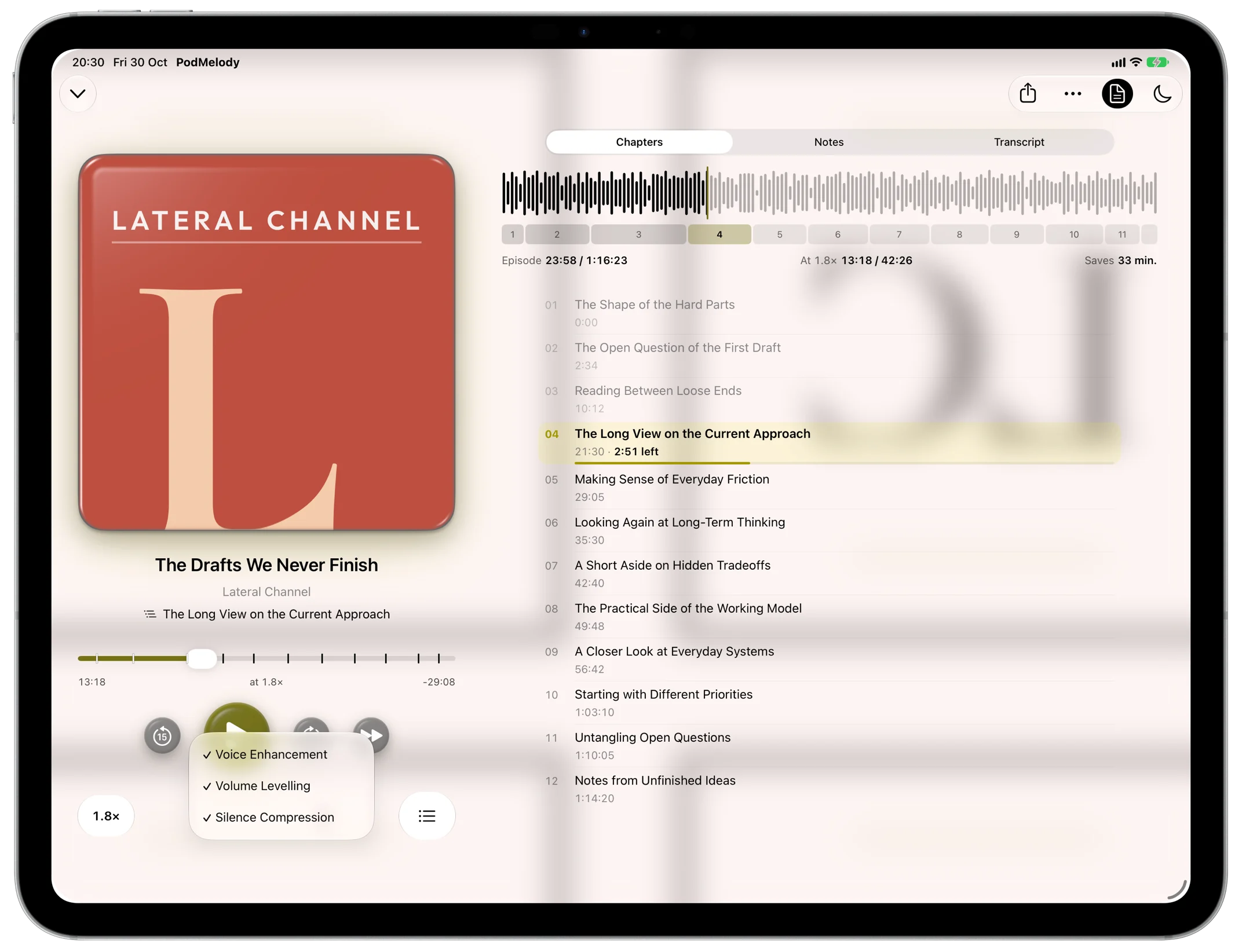
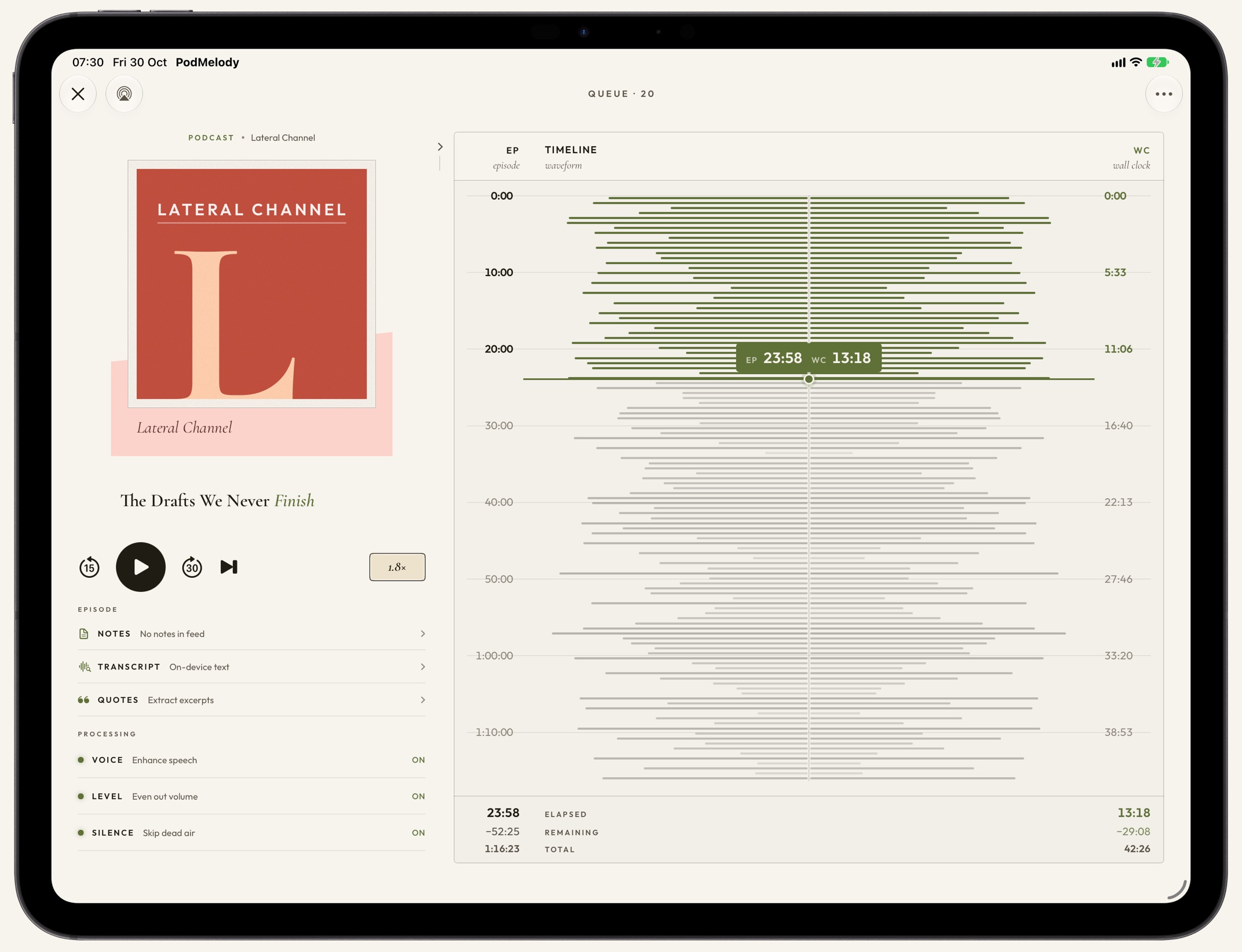
PodMelody playing a podcast on iPad in the System look: the cover and controls on the left with the Audio menu open and Voice Enhancement, Volume Levelling and Silence Compression ticked, and on the right a waveform and chapter strip showing the episode's 1:16:23 against 42:26 at 1.8×, saving 33 minutes, above the chapter listPodMelody playing a podcast on iPad in the Editorial look: a full waveform timeline with episode and wall-clock scales, totals of 1:16:23 and 42:26 at 1.8×, and voice enhancement, volume levelling and silence compression all on in the Processing section
Episode time against wall clock — a 1:16:23 episode maps to 42:26 at 1.8×, and the strip above the chapters shows how much time that saves. Voice enhancement, volume levelling and silence compression are in the player's Audio menu.with episode and wall-clock elapsed and remaining time traced across the same waveform, and voice enhancement, volume levelling and silence compression in the player's Processing section. Shown full screen on iPad; the same tools are on iPhone.

CarPlay, with Plus

Your mix, chosen from the dash.

Plus brings Mix, Queue and Browse to CarPlay. Mix lists your podcast stations, shows, music stations and playlists; tap one to add it to the mix or take it out, then start the mix without picking up the phone.
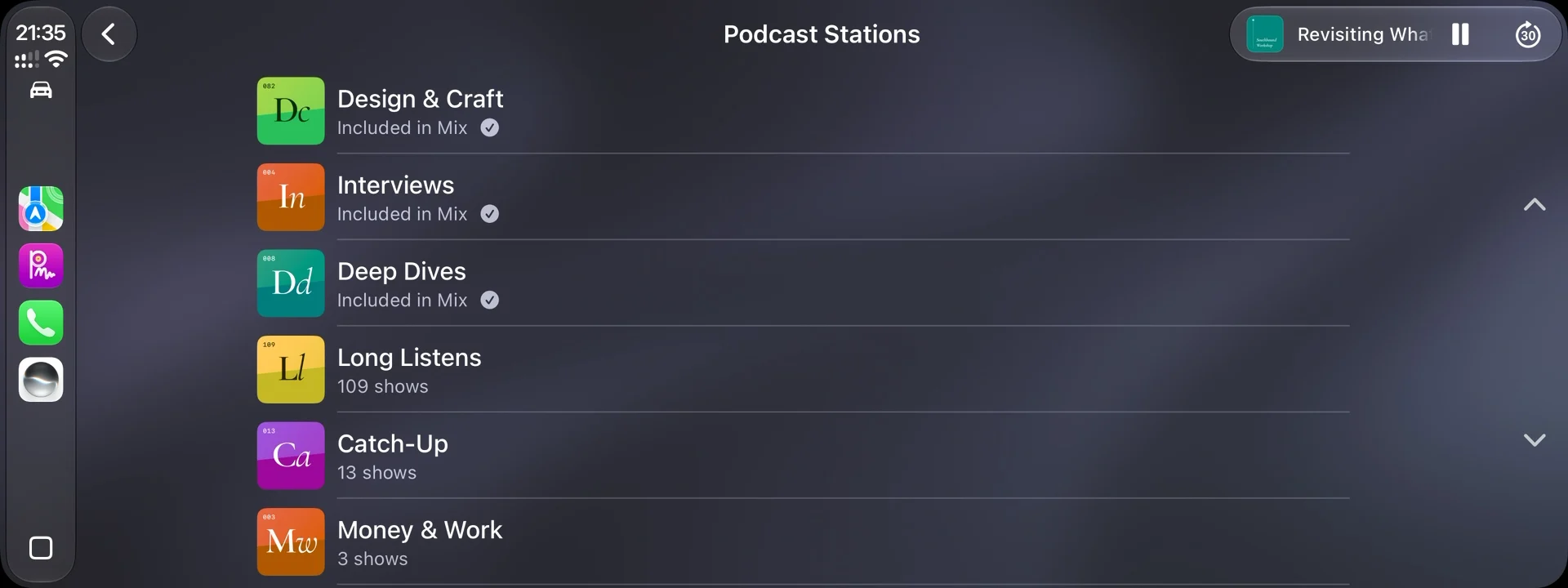
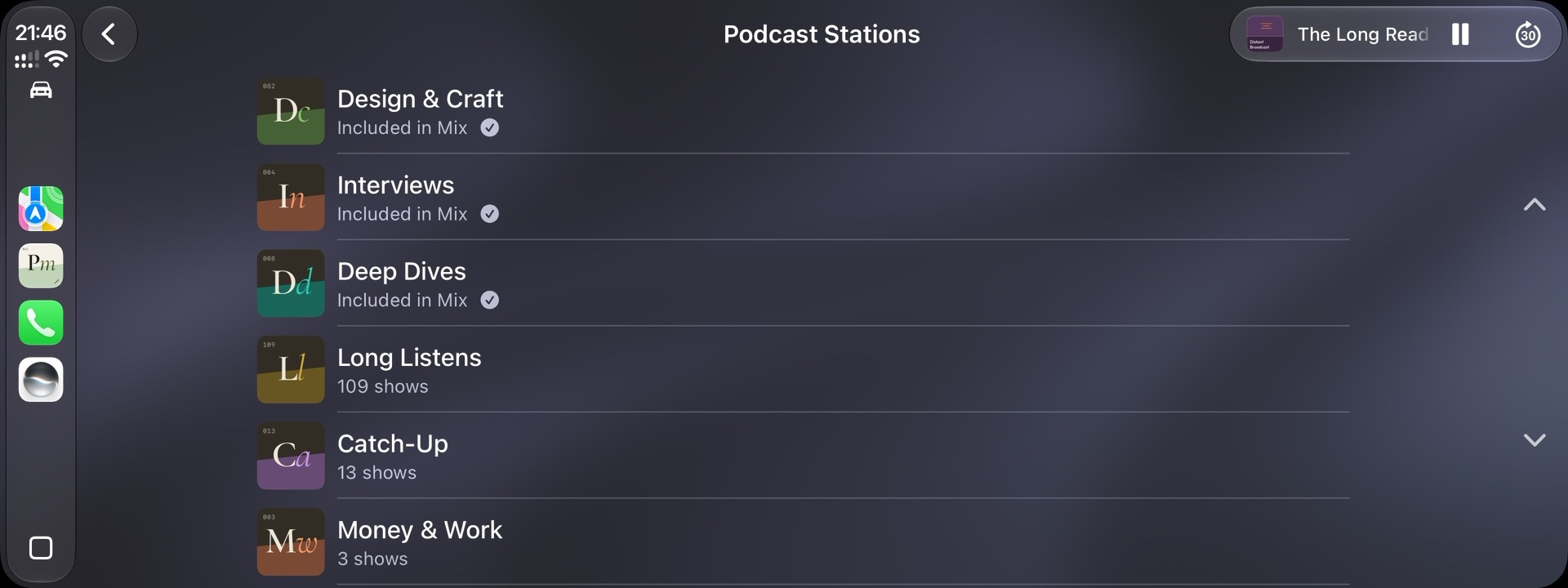
PodMelody's Mix on a CarPlay screen: a list of podcast stations, each with its stamp, three marked Included in Mix and the rest showing how many shows they holdPodMelody's Mix on a CarPlay screen: a list of podcast stations, each with its stamp, three marked Included in Mix and the rest showing how many shows they hold
Mix, on the dash — three stations included in the mix, and the rest a tap away.

Nobody pays to be in your queue. The shows you choose, in the order you want them, at the speed you set.