PodMelody
Menu

Features

Everything you follow, in the same session.

Built for people who listen a lot, attentively, across a mix of podcasts and music. Here's the whole box.

01 · One queue

One continuous mix of podcasts and music.

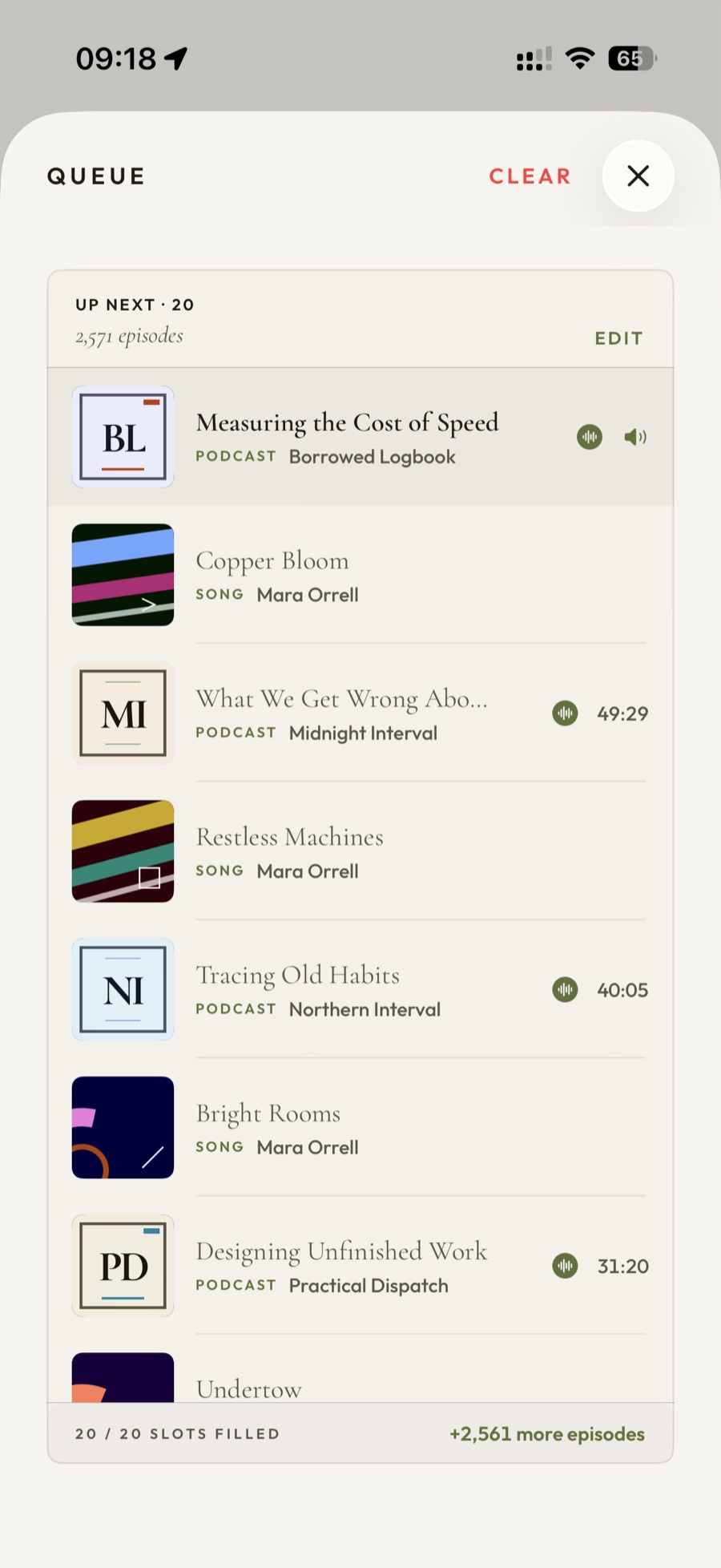
Every item — episode or track — is the same kind of thing under the hood, so they queue together seamlessly. Set how many songs play between episodes and PodMelody weaves them: a show, a couple of tracks to clear your head, the next show. Reorder anything, anytime.

PodMelody's queue on iPhone: one continuous list alternating between rows marked PODCAST and rows marked SONG, footed by a count reading 20 of 20 slots filled
The queue — songs and episodes in one list, in the order the mix built them. Drag to reorder, swipe to remove; the slots refill as you listen.
PodMelody's playback speed sheet: podcast speed set to 2.7× with minus and plus controls, preset buttons from 1× to 2.5×, and a note reading Pre-processed and ready
The speed sheet — 0.1× steps or a preset, per show. "Pre-processed and ready" means this episode was re-rendered at your speed ahead of time, which Plus does for you.

02 · Speed & silence

Fast, but it still sounds like a voice.

Podcast speed runs from 0.5× to 3.0× in 0.1× steps, and it doesn't have to be one number for everything — any show can keep its own, so a dense interview sits at 1.2× while a host you know well runs at 2.4×. Set it once and PodMelody remembers which is which. Underneath is our own custom audio time-compression algorithm, tuned specifically for podcast speech legibility — it is the whole reason the slider goes that far while a voice still sounds like a voice well past 2.0×, instead of thin and brittle. Songs are never sped up; music plays at the tempo it was recorded. Silence compression — part of Pro audio in Plus — quietly trims the dead air between sentences, so an hour of talk takes the time it deserves.

Plus takes the work off the iPhone entirely. Switch on pre-processing and downloaded episodes are re-rendered at your speed ahead of time, so what plays in the car is an ordinary file at 1.0× — no live audio processing at all. That matters most on the dash, where navigating and playing audio is already enough to make an iPhone run hot without asking it to do DSP on top. It can hold off until you're on a charger, and it works away in the background.

03 · CarPlay · Version 1.1.0 TestFlight

The whole player, not a stripped-down list.

Version 1.0.0 includes basic CarPlay playback controls. Version 1.1.0 — coming soon and already in TestFlight — brings the full PodMelody experience to the dash: your interleaved queue, browse, and transport controls, with big glanceable targets and cover art you can read at a glance. Change speed, skip a song, jump to the next episode. The car keeps its own speeds, too — a separate default that takes over the moment CarPlay connects, with per-show overrides to match, because what reads fine on headphones is usually a shade too quick over road noise. You can reshape the mix itself from the driver's seat too — switch the music source feeding the queue, or change how many songs play between episodes, so the drive out can lean on music and the drive home can go back to talk.

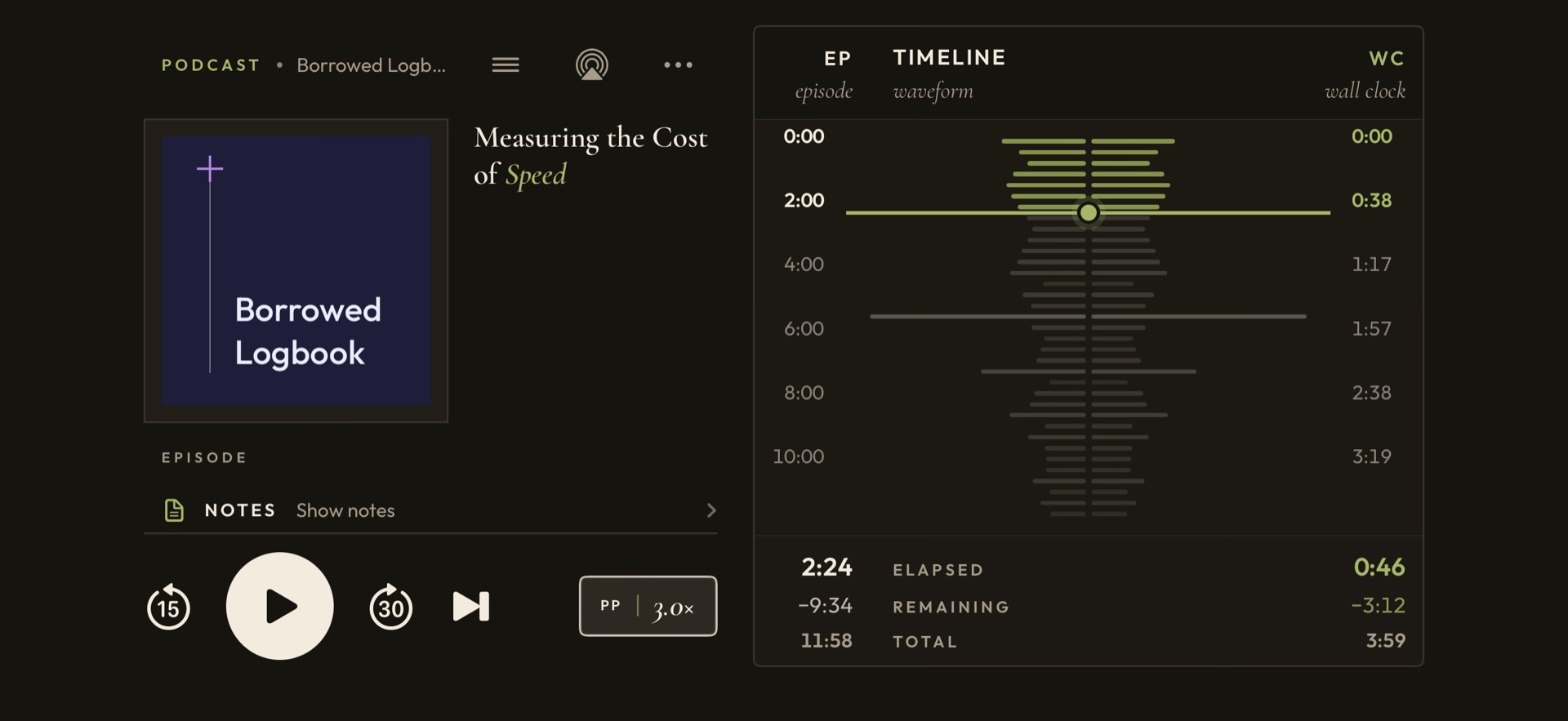
PodMelody playing on a CarPlay screen: episode title and show, large skip-back, play and skip-forward controls, a progress bar, and a row of speed controls showing 2×
Now Playing, on the dash — the Version 1.1.0 transport, scrubber and speed controls, captured from a 1920×720 head unit. Now in TestFlight.
PodMelody Browse on a CarPlay screen, showing shelves for Podcast Stations, Podcast Shows and Music Stations
Browse from the dash — podcast stations, individual shows, music stations and playlists stay within reach, without touching the phone.
Downloaded · ready to go
The science of sleep✓ 52 min
Deep work✓ 41 min
Attention, pleasedownloading…
Resumes at38:04iPhone · iPad · car

04 · Offline & sync

Ready before you go, and it keeps your place.

New episodes download automatically — the moment you open PodMelody, and in the background when iOS allows it — so the subway, the flight and the dead zone on the drive are covered. Your position travels with them, so picking the same episode up on your iPad starts you where you stopped rather than back at the beginning.

05 · Keep & organise

Six separate shows, or one station.

Your shows organise into stations — named sets like Commute or The Long Drive Home — so building a mix means picking a station rather than tapping through six separate shows; a show can sit in more than one, and a station counts as one source however many it holds. Choose your sources, hit Start Mix, and the queue builds from there. Bookmark a moment you want to come back to, and chapters, per-show settings and a proper library round it out.

Commute · 6 shows The Long Drive Home · 4 shows Slow Hours · 3 shows Open Workshop · 5 shows

Everything at a glance

The whole listening life, accounted for.

The essentials are part of PodMelody Free. Features marked Plus are for listeners who want bigger mixes, offline readiness, deeper audio control and the full dashboard experience. Free + Plus groups combine features from both.

Release note: this catalogue includes Version 1.1.0, currently in TestFlight. Version 1.0.0 remains the App Store release.

Build the mix

Core
  • Mix individual shows, Podcast Stations, Apple Music playlists and Apple Music stations.
  • Choose how many songs sit between episodes, whether talk or music starts, and whether playlists shuffle.
  • Rotate music sources song by song or break by break, in the order you choose.
  • Inspect, reorder, remove, jump through or clear the rolling queue as it refills.
  • Use Play Now for one episode, song or source without changing the mix you saved.

Your podcast library

Core
  • Search for shows, add RSS and private feeds, or import from Apple Podcasts and OPML.
  • Group shows into reusable Podcast Stations; one show can belong to more than one.
  • Search, sort and filter episodes by unplayed, played or skipped state.
  • Read show notes, browse chapters, jump by chapter and see chapter artwork when a show provides it.
  • Keep bookmarks, share public episodes, receive new-episode alerts and revisit listening history.

Apple Music, in its place

Core
  • Browse and search library playlists, Apple recommendations and Apple Music stations.
  • Take exactly one song from a station for each music slot, then return to PodMelody's queue.
  • Play a track or station immediately when you do not want to build a full mix.
  • Add tracks to your library, Favourite, Suggest Less, or open the current song in Apple Music.
  • Music always plays at its recorded tempo, regardless of podcast speed.

Playback that remembers

Core
  • Listen from 0.5× to 3.0× in 0.1× steps, with a different remembered speed for every show.
  • PodMelody uses its own custom audio time-compression algorithm, tuned specifically to keep podcast speech legible at faster speeds.
  • Start listening while an episode downloads, then move smoothly to the local file.
  • Pick up a partially played episode with a short context rewind, so you hear the last few seconds again instead of landing mid-thought.
  • Use the Sleep Timer for a chosen number of minutes or to stop when the current episode ends.
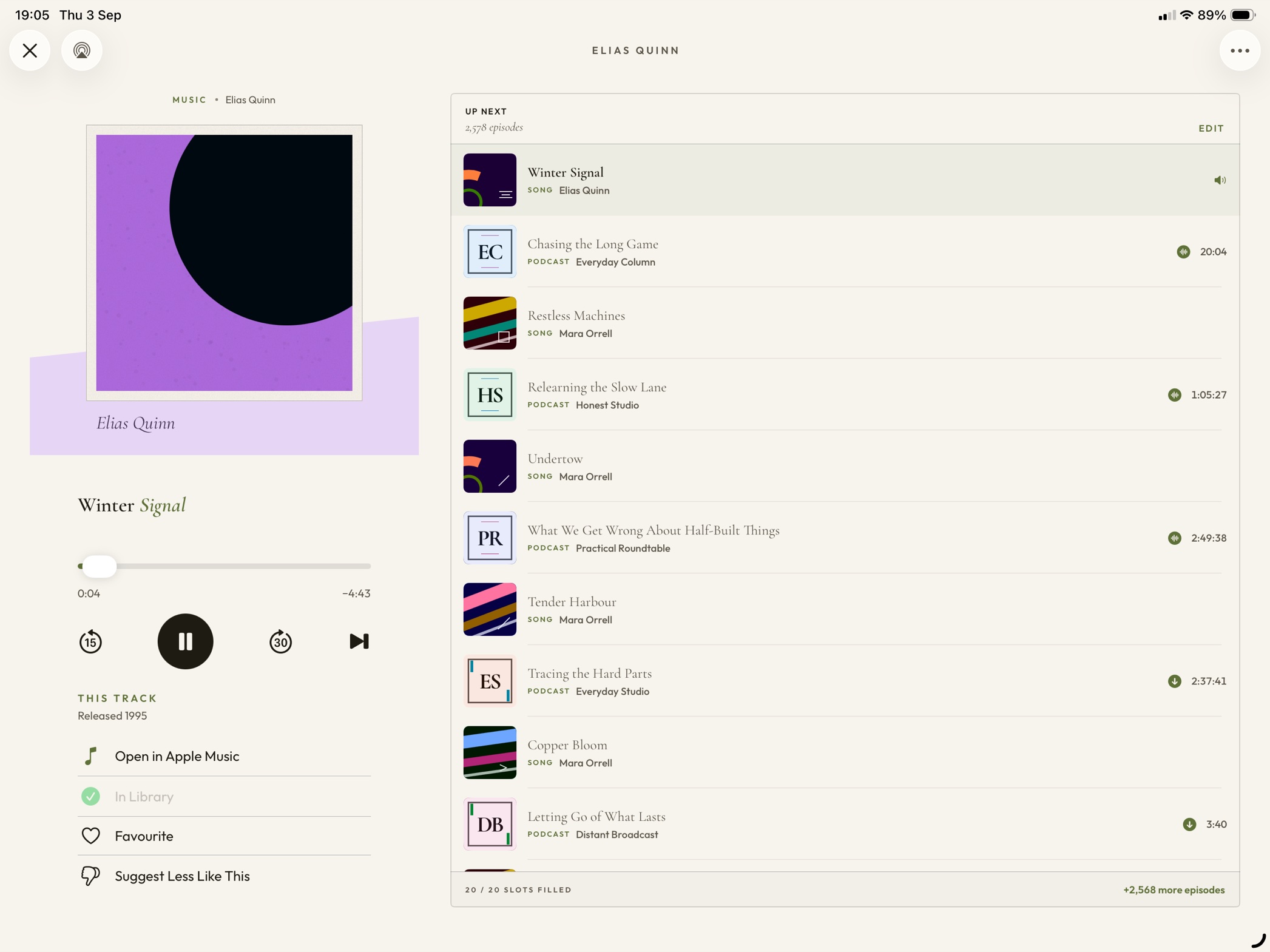
  • On iPad, see the episode waveform and time-saved views.
  • Filter episodes and songs labelled explicit, with the same Explicit Content toggle available in CarPlay.

Pro audio

Plus
  • Voice enhancement adds speed-aware clarity and gentle speech compression.
  • Volume levelling keeps podcasts consistent; with Sound Check enabled in Apple Music, your shows and songs stay closer to the same level.
  • Silence compression shortens dead air without touching the music.
  • On-device sound analysis can label the moment and ease the speed around laughter.
  • Pre-process downloaded episodes in the background, optionally only while charging.

Offline and readable

Plus
  • Keep a chosen number of unplayed episodes ready, with individual limits for shows and stations.
  • Restrict downloads to Wi-Fi, watch progress, inspect storage and clear files when needed.
  • Create on-device transcripts for downloaded episodes.
  • Follow the spoken paragraph as the episode plays, or snap back to the current point.

Everywhere you listen

Free + Plus
  • Restore the current item, position and remaining queue after relaunch.
  • Sync shows, stations, selected settings, progress, bookmarks, history and queue continuity through iCloud.
  • Continue a podcast with Handoff; control playback from the Lock Screen, Control Centre and Dynamic Island.
  • Use AirPlay, Bluetooth, AirPods and ordinary remote controls.
  • Start, play, pause, skip and set a sleep timer with Siri or Shortcuts.

Yours to shape — and keep

Free + Plus
  • Choose Light, Dark or Automatic appearance.
  • Use the signature Editorial interface, with the Apple-style System interface included in Plus.
  • See mixes started, listening streaks, recent listening time and fresh-episode counts on Home.
  • Import or export OPML and make a full PodMelody backup of stations, artwork and history.
  • No PodMelody account and no advertising — on Free or Plus.
  • Your PodMelody library and listening data stay on your devices or in your own iCloud account; PodMelody has no separate cloud store.
Free is the complete core player, not a trial. Mix up to four sources, keep six upcoming items visible, use per-show speed, chapters and iCloud continuity, and listen without ads. Plus removes the source ceiling, expands the editable queue to 100 items and adds the deeper tools above.
Compare Free and Plus
Built for the long haul. Plus unlocks the deep end.
See PodMelody Plus